CV Bazar collection
Shiuli
CV template
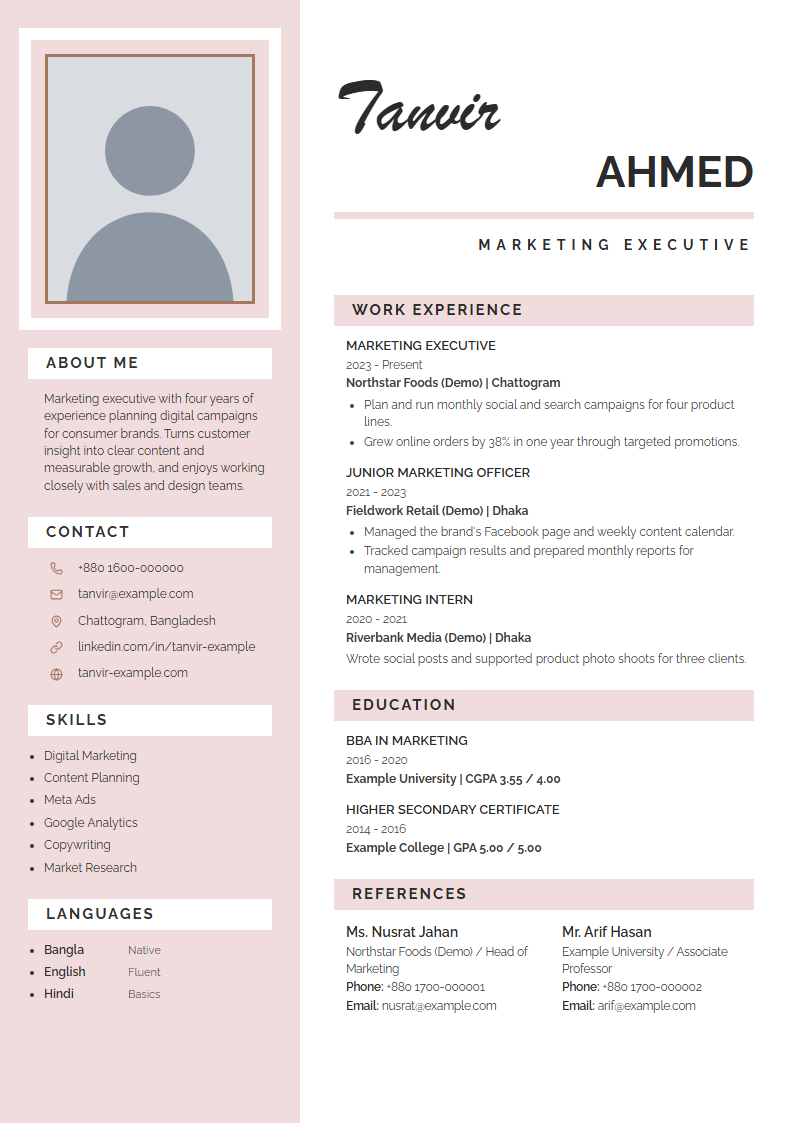
Shiuli is a free, editable A4 CV template with a photo. A blush sidebar frames a rectangular portrait in a double border and holds your profile, contacts and skills under white tab headings, beside a flowing script first name, a bold surname and pink heading bars.
Designers, architects and creative professionals who want an elegant photo CV with a personal touch.
- Paper
- A4 · 210 × 297 mm · Portrait
- Format
- Blush sidebar with a framed portrait, script first name over a bold surname and tabbed pink headings
- Best for
- applicants comparing professional and specialist CV formats
- Photo
- Yes — upload, crop and rotate
- ATS
- Visual design, selectable text
- Colour
- Fixed designed colour scheme
- Price
- Free for job seekers
How to use the Shiuli template
- Open the template. Choose "Use this template" to open Shiuli in the free CV Bazar builder.
- Add your details. Enter your contact details, work experience, education and skills — or import an existing CV.
- Personalise the design. Upload your photo, then drag, zoom and rotate it to fit the frame.
- Print or save as PDF. Print on A4 portrait at 100% scale, or save a PDF to email or upload.
Shiuli template — questions and answers
What does the Shiuli CV template look like?
A blush sidebar frames a rectangular portrait in a double border and holds your profile, contacts and skills under white tab headings, beside a flowing script first name, a bold surname and pink heading bars.
Who is the Shiuli template best for?
Designers, architects and creative professionals who want an elegant photo CV with a personal touch.
Is Shiuli ATS-friendly?
Shiuli is a visual CV design. Its text is selectable, but decorative columns and graphics can confuse some applicant tracking systems. Use it for emailed, printed or in-person applications, and choose an ATS-friendly resume template for online job portals.
Can I add a photo to the Shiuli template?
Yes. Upload a JPG, PNG or WebP photo in the builder, then drag, zoom and rotate it to fit the frame. The photo prints with the rest of the CV.
Can I change the colour of Shiuli?
Shiuli keeps its own designed colour scheme so the artwork, photo frame and headings stay balanced. If you need a different colour, compare the sidebar or ATS-friendly templates, which let you pick any accent colour.
Shiuli টেমপ্লেটে কীভাবে সিভি বানাব?
"Use this template" চাপুন, তারপর নিজের নাম, যোগাযোগ, অভিজ্ঞতা, শিক্ষা ও দক্ষতা লিখুন। পছন্দমতো রং বেছে নিন, তারপর A4 সাইজে প্রিন্ট করুন বা PDF হিসেবে সেভ করুন। চাকরিপ্রার্থীদের জন্য পুরোটাই বিনামূল্যে।