CV Bazar collection
Charcoal Split
CV template
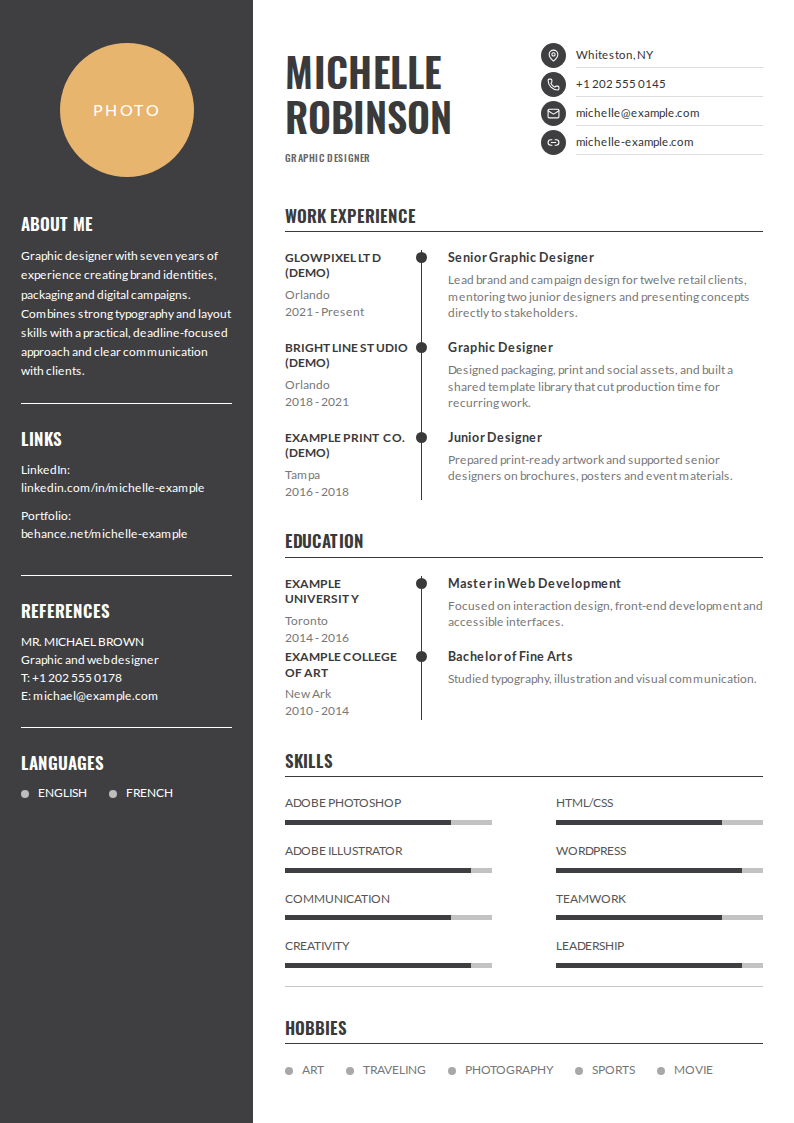
Charcoal Split is a free, editable A4 CV template with a photo. A charcoal sidebar carries your photo, profile, links and references, while condensed Oswald headings and a three-part timeline row — company, dot and role — keep the main column easy to scan.
Graphic designers, web designers and other creative professionals who want links, skill bars and hobbies on one tidy page.
- Paper
- A4 · 210 × 297 mm · Portrait
- Format
- Charcoal sidebar with links and references, condensed headings, three-column timeline and skill bars
- Best for
- applicants comparing professional and specialist CV formats
- Photo
- Yes — upload, crop and rotate
- ATS
- Visual design, selectable text
- Colour
- charcoal by default — any accent colour
- Price
- Free for job seekers
How to use the Charcoal Split template
- Open the template. Choose "Use this template" to open Charcoal Split in the free CV Bazar builder.
- Add your details. Enter your contact details, work experience, education and skills — or import an existing CV.
- Personalise the design. Keep the charcoal accent or pick another colour, and upload and crop your photo.
- Print or save as PDF. Print on A4 portrait at 100% scale, or save a PDF to email or upload.
Charcoal Split template — questions and answers
What does the Charcoal Split CV template look like?
A charcoal sidebar carries your photo, profile, links and references, while condensed Oswald headings and a three-part timeline row — company, dot and role — keep the main column easy to scan.
Who is the Charcoal Split template best for?
Graphic designers, web designers and other creative professionals who want links, skill bars and hobbies on one tidy page.
Is Charcoal Split ATS-friendly?
Charcoal Split is a visual CV design. Its text is selectable, but decorative columns and graphics can confuse some applicant tracking systems. Use it for emailed, printed or in-person applications, and choose an ATS-friendly resume template for online job portals.
Can I add a photo to the Charcoal Split template?
Yes. Upload a JPG, PNG or WebP photo in the builder, then drag, zoom and rotate it to fit the frame. The photo prints with the rest of the CV.
Can I change the colour of Charcoal Split?
Yes. Charcoal Split starts in charcoal, its signature colour, and you can switch to any other accent colour in the builder at any time. The colour carries over to the matching cover letter.
Charcoal Split টেমপ্লেটে কীভাবে সিভি বানাব?
"Use this template" চাপুন, তারপর নিজের নাম, যোগাযোগ, অভিজ্ঞতা, শিক্ষা ও দক্ষতা লিখুন। পছন্দমতো রং বেছে নিন, তারপর A4 সাইজে প্রিন্ট করুন বা PDF হিসেবে সেভ করুন। চাকরিপ্রার্থীদের জন্য পুরোটাই বিনামূল্যে।