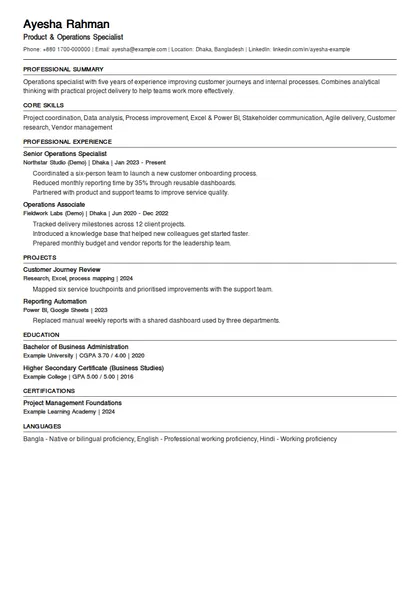
ATS-friendly
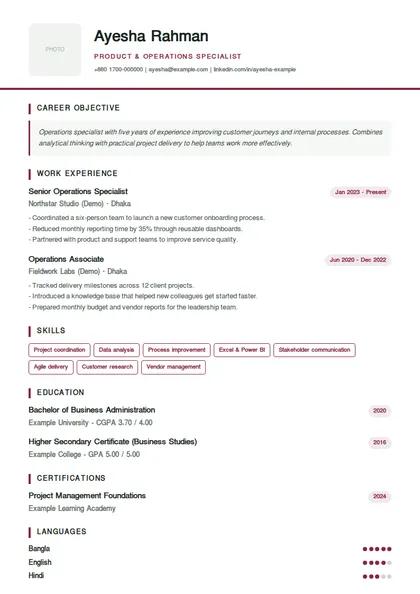
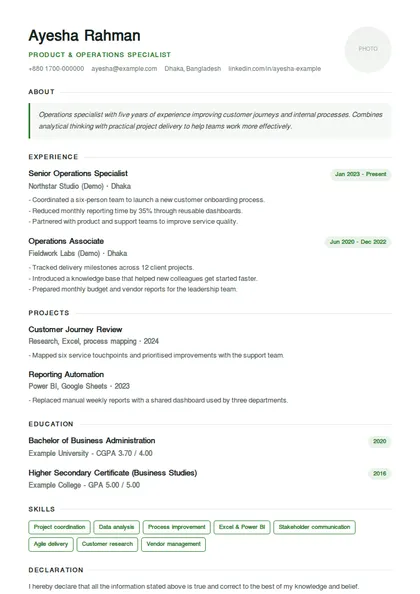
One-column layouts with real, selectable text and standard headings that job-portal software can read.
Follow a complete example from a blank CV to a checked PDF. Read each step, compare the templates, then write your own information in the builder.
Start my CVChoose your experience level on CV Make. For your first CV, choose No experience and No, start from scratch. If you already have a CV, choose the import option, sign in and review the imported information before using it.
ExampleA recent graduate selects No experience. Someone with four years of employment selects 3-5 years.
Before moving on: Keep your existing PDF before replacing a saved draft. Opening this tutorial does not change your CV.
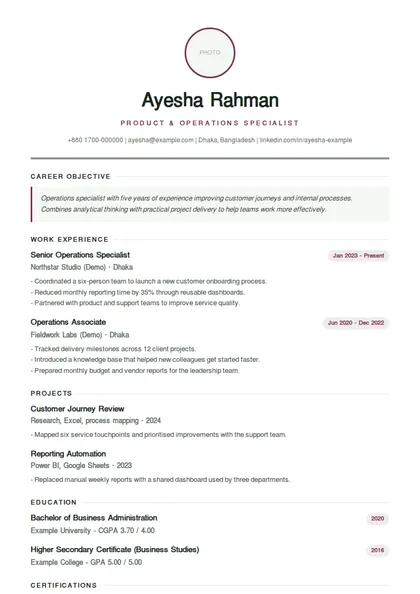
Open this part in the CV makerCompare the six previews below. Student / Fresher puts education and projects first. ATS-Friendly Resume uses one column for online applications. Select a template and choose Use this template; Choose later uses a recommended starting layout.
ExampleFor a junior developer application, begin with Student / Fresher or ATS-Friendly Resume.
Before moving on: Follow the employer's file and photo requirements. A template or ATS score cannot guarantee an interview.
Open this part in the CV makerIn Heading, enter your name, target profession, city, country, email and phone. Add a relevant portfolio or LinkedIn link if available. Use a phone number you can answer and check the email spelling.
ExampleName: Demo Candidate | Profession: Junior Software Developer | Email: demo.candidate@example.com (example only).
Before moving on: Use your own details, not the demo's. Do not add passwords, bank details or sensitive identity numbers.
Open this part in the CV makerAdd your latest relevant role first: job title, employer, location, dates and responsibilities. Describe what you did, how you did it and the result. With no paid experience, skip invented jobs and use real internships, volunteering or projects where appropriate.
ExampleBuilt a searchable inventory page using JavaScript and SQL; tested the search and documented the setup.
Before moving on: Every employer, date, skill and result must be true. Only include numbers you can support.
Open this part in the CV makerEnter your latest qualification, field, institution and completion year. Mark ongoing study accurately. Add a result only if relevant, and list useful coursework or a final project if you are a fresher.
ExampleBSc in Computer Science | Your university | Expected 2027 | Final project: task management application.
Before moving on: Replace all example institutions and years. Do not describe an unfinished degree as completed.
Open this part in the CV makerRead the job advertisement and add skills you actually have. Use clear names, such as JavaScript, SQL, Excel or customer support. Include languages at an honest level in Additional sections when relevant.
ExampleFor a junior developer: JavaScript, HTML, CSS, Git and SQL, but only if you can demonstrate them.
Before moving on: Do not copy every keyword from the advertisement. Prioritise the skills required for the role.
Open this part in the CV makerIn Summary, write two or three sentences about your background, strongest relevant skills and target role. Draft it after education and work history. Review any AI suggestion against your real information before accepting it.
ExampleComputer science graduate with academic web projects using JavaScript and SQL. Seeking a junior developer role to contribute to tested, maintainable applications.
Before moving on: Avoid unsupported claims such as expert or guaranteed results. Remove anything that does not describe you.
Open this part in the CV makerUse Additional sections for relevant projects, training, certifications and languages. For a project, name the problem, your contribution and tools. Add references only with permission. In Cover Letter, write a separate job-specific letter if the employer requests one.
ExampleProject: Study Planner. Built task creation, deadlines and filtering with JavaScript. Tested keyboard navigation and documented the project.
Before moving on: Leave irrelevant personal details and empty sections out. A cover letter should name the role and employer, not repeat the whole CV.
Open this part in the CV makerIn Finalise, inspect the whole preview. Compare it with the job requirements, check spelling and dates, and remove demo content. ATS and AI reviews are suggestions, not verification. Voice input can draft from your facts after microphone permission; a demo request produces fictional content only.
ExampleRead the email address aloud, compare employment dates, and check that your most relevant project appears clearly.
Before moving on: Guest drafts belong to this browser and device; clearing site data can remove them. Sign in for account saving where offered and keep a PDF copy.
Open this part in the CV makerChoose Print / Save CV as PDF in Finalise. Select Save as PDF in the device's print or share menu, use A4 and inspect the print preview. Save, reopen the file and check every page before applying. The available options vary by browser.
ExampleFilename: YourName_SoftwareDeveloper_CV.pdf. Check selectable text, page breaks, contact details and the employer's file-size limit.
Before moving on: Remove blank pages and browser headers/footers if shown. If the employer requires DOCX, prepare it separately; renaming a PDF does not create a Word document.
Open this part in the CV makerChoose a template to inspect the same example in a different layout. This selection changes the demonstration only.
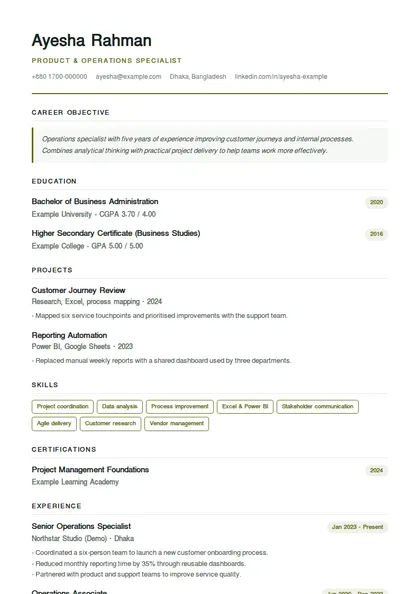
Student / Fresher: Education and projects first, without a photo. A useful starting point for a first job.
Fictional examples, not job-application credentials. Replace every sample fact before applying. Your saved draft is unchanged.
The tutorial is in English. The example CV is also in English; changing the tutorial language does not translate your own CV or all template headings.
- Coursework: databases, software engineering and web development. Final project: a study planning application.
- Built task creation, due dates and filtering for a study planner. - Stored tasks locally and tested empty, overdue and completed states. - Documented setup steps and tested keyboard navigation.
- Designed a searchable catalogue with book availability and borrowing history. - Created reusable forms, validated inputs and wrote database queries. - Collaborated with three classmates through Git branches and code reviews.
Free online CV maker for Bangladesh
Build a job-ready CV or resume with guided questions, professional templates, live preview, ATS checks and PDF download. It works for freshers, experienced professionals and career changers.
বাংলাদেশে চাকরির জন্য সহজে ফ্রি প্রফেশনাল সিভি তৈরি করুন—অভিজ্ঞতা না থাকলেও ধাপে ধাপে তথ্য দিন, টেমপ্লেট বেছে নিন এবং PDF ডাউনলোড করুন।
CV Bazar is an online CV and resume builder for job seekers in Bangladesh. Choose a template, fill in guided sections, preview your CV and save it as a PDF. You can start as a guest on mobile or desktop; imports, account saving and some AI tools require sign-in.
Have these ready: your contact details, education, recent experience or projects, and skills relevant to the job. Never add passwords, bank details or sensitive identity numbers to your CV.
Free for every job seeker
One-column layouts with real, selectable text and standard headings that job-portal software can read.
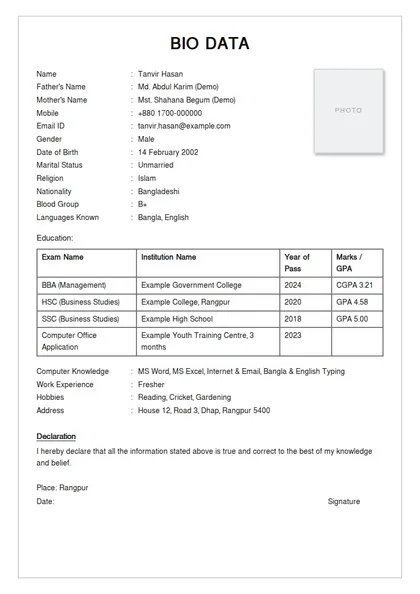
A formal Government / BCS style with father's and mother's names, permanent address and quota fields.
Start immediately — your draft stays on your device until you choose to create an account.
Print or save your CV as a PDF from your browser at no cost, as many times as you like.
Guidance in বাংলা, हिन्दी and العربية, and Bangla text in your CV or marriage biodata.
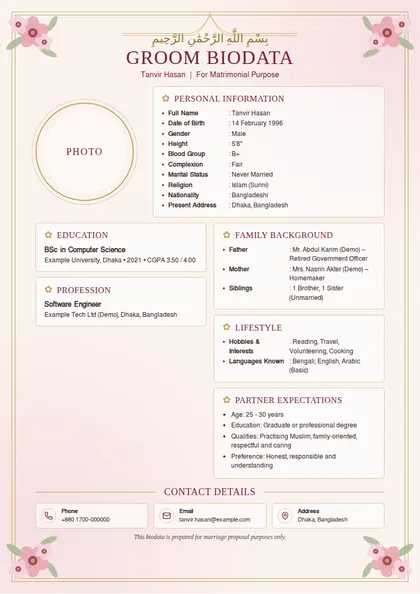
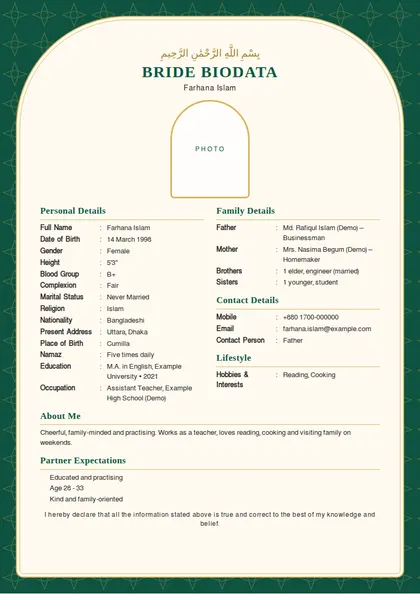
Fresher, professional, ATS, government, overseas and marriage biodata designs, all A4 ready.
Four simple steps
Tell us your experience level, start from scratch or import an existing CV, and pick a suitable template.
Follow the guided sections for contact details, experience, education, skills, summary and optional details.
Check the live preview, use the ATS review, and tailor truthful experience details to the job you want.
Finalise the design, proofread names and dates, then print or save your professional CV as a PDF.
CV format BD
বাংলাদেশি সিভিতে সাধারণত যা যা থাকে — প্রতিটি অংশে কী লিখবেন আর একটি উদাহরণ।
| Section | What to write | Example |
|---|---|---|
| Contact details | Full name, phone, professional email, city; LinkedIn or portfolio if relevant. | Farhana Akter · +880 1XXX-XXXXXX · farhana.akter@email.com · Mirpur, Dhaka |
| Career objective | Two or three lines on the role you want and what you offer. | Commerce graduate seeking a junior accounts role where I can apply Tally and Excel skills. |
| Education | Degree, institution, passing year and result — newest first, including SSC and HSC. | BBA (Accounting), Example University, 2024, CGPA 3.45 |
| Experience | Job title, organisation, dates and two to four achievements per role. | Sales Executive, Example Ltd, 2022–Present — grew monthly orders by 20% |
| Skills & training | Job-relevant computer, technical and language skills; courses with institute and year. | MS Excel (advanced), Tally ERP 9 · Computer Office Application, 2023 |
| Personal details | Usually expected in Bangladesh: father's and mother's names, date of birth, nationality, religion, address. | Father: Md. Abdul Karim · Date of birth: 14 Feb 2001 · Nationality: Bangladeshi |
| References & declaration | Two non-relative references with designation and phone; a one-line declaration and signature. | Dr. Rahman, Professor, Example University, +880 1XXX-XXXXXX |
Government jobs: follow the circular's own online form first. When a separate CV is allowed, the Government / BCS template keeps the formal order recruiters expect. Freshers can start with the Student / Fresher template.
Real A4 previews of popular designs — open one to see it full size, then use it free in the builder.
Pick a useful starting point
Browse all CV templates and A4 design previews
These options are available in the builder. The employer's instructions always come first.
One column, no photo and standard headings. A practical starting point when an employer uses an online application system.
One column, no photo, with education and projects first. Useful when you have little or no paid work experience.
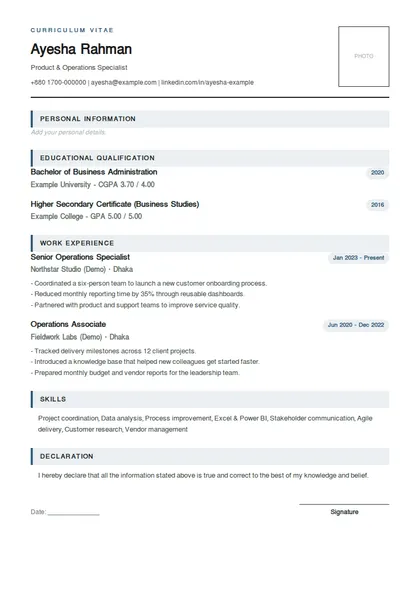
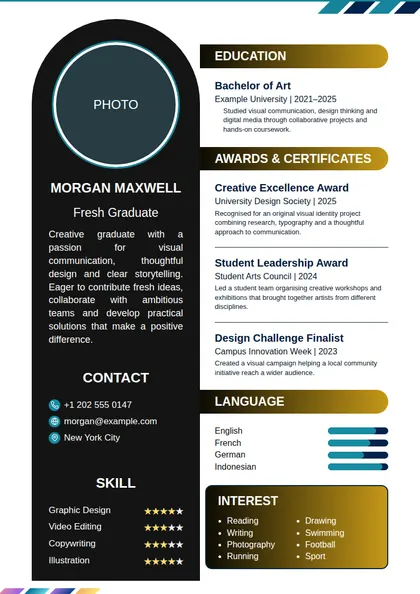
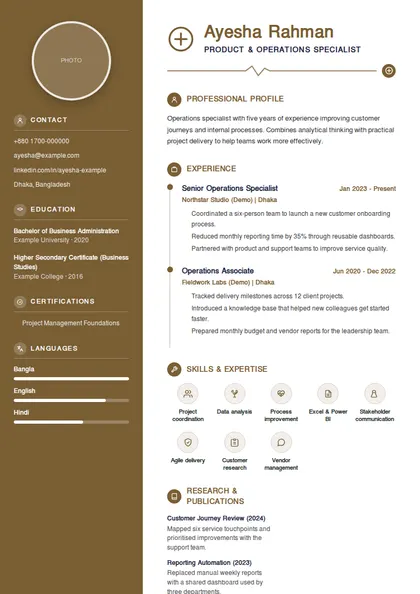
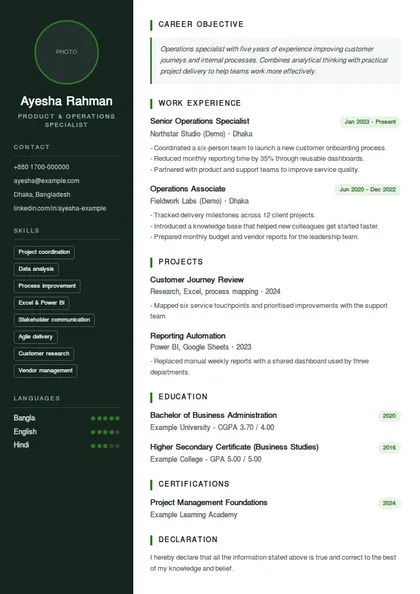
A two-column design with a photo option. Consider it when the employer accepts a visual CV; use the ATS layout if simple formatting is requested.
Before applying: verify contact details, check spelling and dates, remove template sample text, and open the saved PDF to check every page. A template or ATS score cannot guarantee an interview.
CV maker FAQ
Clear answers about CV format, ATS compatibility, freshers, Bangla content, accounts and PDF download.
Read the responsibilities and qualifications, then prioritise skills, projects and achievements that match your real experience. Use the employer's terminology only when it accurately describes your work. Do not add skills just to match keywords. Check the required file format and application deadline before submitting.
Keep employment dates accurate. Where relevant, briefly mention training, study, volunteering or personal projects completed during the gap. Do not invent employment to hide it. You do not need to disclose sensitive medical or family details.
Open the saved PDF and inspect every page, characters, phone number, email address and dates. Remove sample text and unintended blank pages. For ATS applications, check that text can be selected and copied. Follow the employer's requested file type and size limit.
Open CV Bazar's CV Make tool, choose your experience level and a template, then complete the guided sections for contact details, work history, education, skills and summary. The core CV builder is free for job seekers, and you can save the finished CV as a PDF.
Choose the ATS-Friendly Resume template for a single-column layout with selectable text and standard section headings. Other visual templates use different layouts. No template or review score guarantees acceptance by every applicant tracking system or an interview. Follow the employer's file requirements and describe your relevant skills truthfully.
For most private, NGO, bank and technology jobs in Bangladesh, a concise reverse-chronological CV with clear contact details, a short summary, recent experience, education and relevant skills is a reliable choice. Use the employer's requested format whenever a job circular gives specific instructions.
Yes. Select ‘No experience’ and use the Student / Fresher template. Focus on education, projects, internships, volunteering, training, achievements and skills that are relevant to the role you want.
A focused one-page CV is often enough for a fresher, while an experienced candidate may need two pages for relevant achievements and recent roles. Remove repetition and unrelated personal details instead of shrinking useful content into unreadable text.
A photo is optional unless the employer or application instructions request one. Some traditional local roles expect a formal photo, while many multinational and technology employers prefer a skills-focused CV without one. CV Bazar offers both photo and no-photo templates.
Yes. CV fields accept both Bangla and English text. Use the language requested in the job circular; English is common for corporate applications, while some local or government applications may request Bangla.
Complete the guided sections, open Finalise, review the preview and choose Print / Save CV as PDF. In the print window, select Save as PDF and choose where to store the file.
You can start as a guest. The draft saves in the current browser on this device; it does not automatically sync to another browser or phone. Clearing site data or closing a private browsing session can remove it. Keep a downloaded copy. Account-based saving, imports and some AI-assisted features require sign-in.
Yes. Choose the upload option during setup, sign in, and select an existing PDF, Word document or supported image. Review imported information carefully before downloading or applying for a job.
Yes. CV Make is responsive and installable as a Progressive Web App. On mobile, swipe the step and tool menus horizontally, and your draft saves automatically on the device while you work.
The words are often used interchangeably by employers in Bangladesh. A resume is usually a short, job-focused summary, while a full academic CV may be longer. Always follow the wording and document requirements in the job advertisement.
The guided builder exports through Print / Save CV as PDF. Importing a Word document is a separate feature and does not mean the builder exports an editable Word file. If the employer requests DOCX, prepare that file separately instead of renaming a PDF.
Check every suggested job title, date, qualification, skill and achievement against your real experience. Remove invented claims and unsupported numbers. AI suggestions and ATS reviews are writing aids, not verification of your qualifications or a guarantee of getting a job.
Short, direct answers to the CV questions job seekers in Bangladesh search for most — in English, Banglish and বাংলা.
Open CV Make, pick your experience level, choose a template and fill in contact details, career objective, education, experience, skills and references. Check the ATS tips, then print or save it as a PDF. Tailor the objective and skills to each job circular before you apply.
A Bangladeshi CV usually has your name and contact details, a career objective, education (SSC, HSC, degree with results), work experience, skills, training, languages, personal details and references, ending with a declaration. Freshers can put projects and training before experience. Leave out anything the job does not need.
For private and multinational jobs, a clean one- or two-column CV with standard headings works best, and the ATS-Friendly Resume suits online portals. For government jobs, follow the circular's own form; a formal bio-data style CV fits when none is given. Keep it to one or two A4 pages. Compare CV templates
Government applications in Bangladesh mostly use the online form in the circular, and any CV is formal: personal details, father's and mother's names, permanent address, quota and education with board and roll. Private employers want a skills-led CV showing achievements and relevant experience instead.
An ATS CV is laid out so applicant tracking software can read it: real text, standard headings like Education and Experience, and no key details hidden in images or tables. Many large employers and job portals in Bangladesh use such systems, so a simple one-column CV is the safest choice online.
Yes. You can build a CV, switch templates and print or save it as a PDF from your browser without creating an account; your draft stays on your device. A free account adds saving several CVs online and applying to jobs on CV Bazar.
Yes. The CV maker's guidance is available in বাংলা, and you can type your CV details in Bangla or English. Most private employers expect an English CV, while marriage biodata and some local jobs are often written in Bangla — choose whichever the employer or family asks for.
Lead with a short career objective, then education with results, projects, internships, training and computer skills. Use the Freshers templates, keep it to one page and add references from teachers or supervisors. Show what you can do through coursework, volunteering and certificates rather than empty claims. Find jobs for freshers
Keep it formal and one or two pages: a short objective, education with full results, any banking or customer-service experience, computer skills (Excel, banking software) and references. Highlight accuracy, sales targets met and integrity. Use a clean format such as Executive or the ATS-Friendly Resume. Executive template
Use a clear English CV with your passport number and expiry when asked, the countries you can work in, trade or professional skills, certificates and work history in the same field. A photo is commonly expected. The Overseas template already has passport and visa fields. Overseas job CV template
Yes. Nurses and doctors can start from the Medical templates, which list registration and clinical skills; teachers can use a one-page Classic or Student layout that puts subjects and training first; engineers suit a skills-led ATS layout. Always match the job circular's requirements. Medical CV template
Keep it to one page: name and phone, a one-line objective, education, the machines, vehicles or tasks you know, years of experience with factory or company names, licence details for drivers, and references. A simple bio data style works well for these roles. Classic Bio Data template
One page is best for freshers and most entry-level jobs; two pages are fine with several years of experience. Government applications follow their own form. Remove old or unrelated details before adding a third page — recruiters often scan a CV in under a minute.
Many employers in Bangladesh still expect a formal passport-size photo, especially for government, bank and overseas jobs, but most multinational and IT employers prefer no photo. Follow the job advertisement. CV Bazar has templates with and without a photo slot.
Send one when the job asks for it or when you apply by email — it explains why you fit this particular role in three short paragraphs. CV Bazar includes free cover letter templates you can fill in next to your CV. Cover letter templates
প্রথমবার সিভি বানাচ্ছেন? শুরু করা, ফরম্যাট বেছে নেওয়া ও PDF সেভ করার সহজ উত্তর।
CV Bazar-এর CV Make খুলে অভিজ্ঞতার স্তর ও টেমপ্লেট বেছে নিন। এরপর যোগাযোগের তথ্য, শিক্ষা, অভিজ্ঞতা ও দক্ষতা লিখুন। Finalise ধাপে দেখে Print / Save CV as PDF চাপুন। মূল সিভি তৈরির সুবিধা ফ্রি; অ্যাকাউন্টে সংরক্ষণ, ইমপোর্ট ও কিছু AI সুবিধায় সাইন ইন লাগে।
শুরুতে No experience এবং Student / Fresher টেমপ্লেট বেছে নিন। শিক্ষাগত যোগ্যতা, নিজের করা প্রজেক্ট, ইন্টার্নশিপ, স্বেচ্ছাসেবামূলক কাজ, প্রশিক্ষণ ও প্রাসঙ্গিক দক্ষতা লিখুন। অভিজ্ঞতার জায়গা পূরণ করতে বানানো চাকরি বা অর্জন লিখবেন না।
মোবাইল ব্রাউজারে তথ্য পূরণ করে Finalise ধাপে Print / Save CV as PDF চাপুন। ডিভাইসের প্রিন্ট বা শেয়ার মেনু থেকে PDF হিসেবে সেভ করুন; অপশনের নাম ব্রাউজারভেদে আলাদা হতে পারে। সেভ করা ফাইল খুলে লেখা, পৃষ্ঠা ও যোগাযোগের তথ্য পরীক্ষা করুন।
আগে নিয়োগ বিজ্ঞপ্তির নির্দেশনা দেখুন। নির্দিষ্ট ফরম্যাট না থাকলে পরিষ্কার শিরোনাম, যোগাযোগের তথ্য, সাম্প্রতিক অভিজ্ঞতা, শিক্ষা ও প্রাসঙ্গিক দক্ষতা দিয়ে সাজান। অনলাইন আবেদনে সহজ এক কলামের ATS-Friendly Resume একটি বিকল্প। সরকারি চাকরির নির্ধারিত ফরম থাকলে সাধারণ সিভির বদলে সেই ফরমই পূরণ করতে হবে।
হ্যাঁ, সিভির তথ্যের ঘরে বাংলা বা ইংরেজি লেখা যায়। তবে টেমপ্লেটের সব শিরোনাম বা অ্যাপের সব নির্দেশনা বাংলায় বদলে যায় না। নিয়োগদাতার চাওয়া ভাষা ব্যবহার করুন এবং PDF সেভ করার পর বাংলা অক্ষর ঠিকমতো দেখা যাচ্ছে কি না দেখে নিন।